Columnar Storage and Parquet
Why columnar files like Parquet speed up analytics, how row groups, chunks and the footer work, and when it fails. A 1M-row test: Parquet 14.82 MB vs CSV 34.97 MB, one-column read 0.010 s vs 0.248 s.
Columnar storage keeps each column's values together, so an analytics query reads only the columns it names and same-typed values compress well. Parquet adds row groups with per-chunk min/max statistics so whole groups can be skipped. The detail interviewers expect: skipping only works when the filter column is sorted or clustered, otherwise every group overlaps.
A columnar format stores each column's values together, so an analytics query reads only the columns it names and the data compresses well. Parquet adds row groups and min/max statistics so whole chunks can be skipped. In a one-million-row test the Parquet file was about 2.4 times smaller than CSV and a one-column read was roughly 25 times faster, but skipping failed on an unsorted column.
- In a one-million-row test, a Parquet file with Snappy was 14.82 MB against 34.97 MB for CSV, about 2.4 times smaller, and 10.56 MB with ZSTD.
- Reading one column from a one-million-row Parquet file took 0.010 s against 0.248 s for the same column from CSV, because Parquet never reads the other column chunks.
- A Parquet file starts and ends with the bytes PAR1; the footer before the closing marker holds the schema, column chunk offsets and min/max statistics, so readers read it first.
- Parquet splits rows into row groups, each row group holds one column chunk per column, and each chunk is a series of pages; the docs recommend 512 MB to 1 GB row groups.
- Parquet predicate pushdown on a random user_id column kept 10 of 10 row groups, while the same lookup after sorting the file by user_id kept 1 of 10.
- Splitting one million rows into 1,000 small Parquet files grew the total from 14.82 MB to 23.59 MB and made a one-column read about 33 times slower.
01Rows and columns: one table, two byte orders
A table is a grid, but a disk is a long line of bytes, so something has to decide the order the grid is flattened in. A row store writes row 1 completely, then row 2, then row 3. A column store writes every value of column A, then every value of column B. The picture below shows three rows of (id, country, price) written both ways.
Neither order is better in general. They answer different questions. If you need everything about order 4,711, the row layout hands you one contiguous run of bytes. If you need the average price across ten million orders, the column layout lets you read the price values and nothing else. Transaction systems ask the first kind of question all day. Reporting and analytics ask the second kind.
The idea is old. The C-Store paper describes a design where the values of each column are stored contiguously, calls conventional row-store databases write-optimized, and argues that systems built for ad-hoc queries should be read-optimized. It also pairs a write-oriented store with a read-oriented one, and a background tuple mover that migrates data between them. Hold on to that last detail, because it comes back when we talk about updates.
02Column pruning: the cheapest speedup
To see the effect I generated one million synthetic orders with seven columns (order_id, country, category, qty, price, user_id, note), wrote them as CSV and as Parquet with pyarrow 26.0.0 and pandas 3.0.5, then timed reads. This is a small 2-core sandbox, each number is the best of three runs, and absolute times will differ on your machine. Treat the ratios as the lesson, not the seconds.
pd.read_csv("o.csv", usecols=["price"])             # 0.248 s
pd.read_csv("o.csv")                                # 0.701 s
pd.read_parquet("o.parquet")                        # 0.090 s
pd.read_parquet("o.parquet", columns=["price"])     # 0.010 s
Two things stand out. A one-column CSV read still cost about a third of a full CSV read (0.248 s against 0.701 s), because the parser has to walk through every line to find the commas. A one-column Parquet read cost about a ninth of a full Parquet read (0.010 s against 0.090 s), because the other six column chunks were never read at all. That is column pruning.
Be careful about the other comparison. Reading all seven columns from Parquet (0.090 s) beat reading all seven from CSV (0.701 s) here, but part of that gap is text parsing versus binary decoding, not layout. If your query wants every column, a columnar file gives you far less of an advantage than the one-column case suggests. Without a benchmark of your own data, a claim like "100 times faster" is a guess.
03Inside a Parquet file
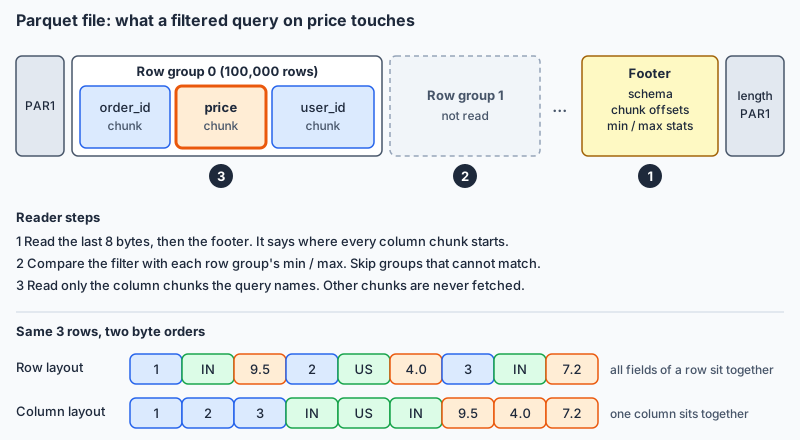
Parquet cuts the table twice. First it splits rows into row groups. Inside each row group, every column gets its own column chunk. A chunk is a series of pages written back to back, and a page is the smallest unit that is read and decoded as a whole.
The file begins and ends with the four bytes PAR1. Before that closing marker sits the footer, followed by its length as a 4-byte little-endian integer. The footer holds the schema, the starting offset of every column chunk, and statistics. The spec explains why it goes last: the writer can stream the data out in a single pass and only know the offsets once it is done.
A reader therefore starts at the end. It reads the final eight bytes, learns the footer length, reads the footer, and from then on can jump straight to any chunk. You can inspect it yourself:
pf = pq.ParquetFile("o.parquet")
print(pf.metadata.num_row_groups, pf.metadata.num_rows)   # 10 1000000
I wrote the file with row_group_size=100_000, which gave 10 row groups of 100,000 rows. That is a demonstration size. The Parquet documentation recommends much larger row groups, 512 MB to 1 GB, so each column chunk is a long sequential read, and it suggests 8 KB pages. Bigger groups need more memory to write and read, so real tools pick their own defaults, which I did not verify here.
04Encodings first, then compression
Same-typed neighbours are easy to shrink. Parquet does it in two stages. First an encoding exploits the shape of the column: dictionary encoding builds a table of the distinct values and stores small integer codes, and a hybrid of run-length and bit-packing stores those codes compactly. Delta encoding stores differences, which suits timestamps and counters. Then a codec such as Snappy, GZIP or ZSTD compresses each page.
Here is what the footer reported for row group 0 (100,000 rows, Snappy):
country   38,004 bytes   (8 distinct values)
order_id  603,346 bytes  (uncompressed 1,003,110)
user_id   483,917 bytes  (uncompressed 703,638)
Eight values need three bits each, and 100,000 times 3 bits is 37,500 bytes, so the country chunk is close to that floor. The text codes US, IN and the rest are never stored per row. The unique order_id column gains much less from a dictionary, though the chunk still came out about 40 percent smaller than its uncompressed size. High-cardinality columns are where this scheme helps least.
Whole-file sizes for the same million rows: CSV 34.97 MB, Parquet with Snappy 14.82 MB, Parquet with ZSTD 10.56 MB. That is about 2.4 times and 3.3 times smaller. Writing was faster too in this run (CSV 2.82 s, Snappy 0.34 s, ZSTD 0.37 s). The Parquet docs do not compare codec speed or ratio, so I will not generalize from one synthetic dataset.
05Skipping data with statistics, and when it fails
Every column chunk stores its minimum and maximum value in the footer. A query with WHERE order_id BETWEEN 250000 AND 259999 can read those numbers and discard any row group whose range does not overlap. That is predicate pushdown at the file level.
In my file order_id runs 0 to 999,999 in order, so each row group covers a separate 100,000 range. Counting overlaps from the footer gave 1 of 10 row groups. The filtered read took 0.015 s; reading everything and then filtering in pandas took 0.110 s.
Now the failure case. user_id is random between 0 and 99,999, so every row group has a minimum near 0 and a maximum near 99,999. Looking up user_id == 54321 kept 10 of 10 row groups and took 0.080 s. The statistics were stored faithfully and were useless.
The fix is to change how the data is laid out, not the query. I rewrote the file sorted by user_id. Now group 0 spans 0 to 9,980, group 1 spans 9,981 to 19,933, and so on. The same lookup keeps 1 of 10 groups and took 0.015 s, returning 5 rows. The sorted file was also smaller, 11.88 MB against 14.82 MB, because similar values sit next to each other and encode better.
Two limits are worth saying out loud. Skipping works at row group granularity (the spec also defines a page index with per-page bounds for finer skipping), so finding 5 rows still reads a chunk of 100,000. And you can only sort by one column at a time, so you choose the column your queries filter on most.
06Nested data: lists and structs as flat columns
Real data has lists and structs: a user with an array of orders, each order with a SKU and a quantity. Parquet uses the Dremel encoding, from the Google paper published in Communications of the ACM in 2011. Every leaf field becomes its own column. Two small integers stored beside each value rebuild the shape: the repetition level says at which repeated field a value starts a new entry, and the definition level says how many optional fields along the path are actually present.
I wrote a two-row table with an orders list of structs and listed the physical columns:
['user', 'orders.list.element.sku', 'orders.list.element.qty']The orders list became two flat columns, one for sku and one for qty. The second user had an empty list, which the levels record without storing any values. Because the leaves are separate columns, you can read orders.sku without touching qty, so pruning still works inside nested data.
07When columnar loses
Parquet files are written once and not edited in place. Changing one row means rewriting a file. This is the same tension C-Store addressed by keeping a separate write store, and it is why table layers built on top of Parquet exist. I did not verify specific features of any of those layers, so check their documentation.
Small files are an easy way to throw the benefits away. I split the same million rows into 1,000 files of 1,000 rows each. The total grew from 14.82 MB to 23.59 MB, because every file repeats its own footer and encoding tables (4,159 bytes of footer metadata in one small file). Reading the price column through pyarrow's dataset API took 0.364 s across the 1,000 files versus 0.011 s from the single file, about 33 times slower on this machine. The column data was identical. Only the layout changed. Dremio's tuning guide makes the same point: small row groups reduce block crossings but hurt the efficiency of the columnar format.
Other cases favour rows. SELECT * needs every chunk, so pruning gives nothing. Fetching one customer by key is a job for an indexed row store. Anything that updates single rows many times a second belongs in an OLTP database.
One more distinction that interviewers like. Parquet is a file format on disk. Apache Arrow is a columnar layout in memory, designed so engines can share data cheaply. They fit together well, and they are not the same thing. Schema changes are another place to be careful: adding a column is easy, but renames and type changes depend on the engine reading the files.
08Common interview questions
Q: Why is a columnar format faster for analytics?
A: Queries usually touch a few columns of many rows. Columnar storage lets the reader fetch only those columns, and values of one type sit together so they encode and compress well. In my test a one-column Parquet read took 0.010 s against 0.248 s for CSV, and the file was 2.4 times smaller.
Q: Walk me through the layout of a Parquet file.
A: The file starts and ends with the bytes PAR1. Data is split into row groups; each row group holds one column chunk per column; each chunk is a series of pages. The footer at the end holds the schema, chunk offsets and min/max statistics, so a reader reads the footer first and then jumps to the chunks it needs.
Q: What is predicate pushdown, and why might it skip nothing?
A: The reader compares the filter with per-row-group min/max statistics and skips groups that cannot match. If the filter column is not clustered, every group spans nearly the full range. A random user_id kept 10 of 10 groups, and sorting the file by user_id cut that to 1 of 10.
Q: A daily 1 GB export is queried on two columns. CSV or Parquet?
A: Parquet for the analytical store, since it reads two columns and compresses well. CSV is still reasonable at system boundaries where other tools need a simple text format.
Q: When would you avoid Parquet?
A: For point lookups by key, workloads that update single rows often, and pipelines that produce many tiny files. Files are immutable, and each small file carries its own footer.
Q: How does Parquet store nested data?
A: By shredding every leaf field into its own flat column and storing repetition and definition levels to rebuild lists and optional fields (the Dremel encoding).