Containers vs Virtual Machines: Namespaces and cgroups
A container is a normal process with a restricted view (namespaces) and budget (cgroups); a VM brings its own kernel. Real runs show PID 1 isolation, an OOM kill at 50 MiB and CPU throttling.
A container is an ordinary process on the host kernel, with namespaces limiting what it can see and cgroups limiting what it can use; a virtual machine runs its own guest kernel on a hypervisor. Interviewers expect the consequence: containers start faster and pack denser, while a VM's separate kernel gives a stronger isolation boundary.
A container is not a small VM. It is an ordinary process on the host kernel, with namespaces limiting what it can see and cgroups limiting what it can use. A VM runs a separate guest kernel, which costs start time and memory but gives a stronger boundary. The experiments here show a shell becoming PID 1, a 200 MiB allocation killed at a 50 MiB limit, and a 50% CPU quota halving CPU time.
- Linux has eight namespace types: cgroup, IPC, network, mount, PID, time, user and UTS; each one hides a single global resource from a process.
- The first process in a new Linux PID namespace gets PID 1, adopts orphaned processes, and from inside the namespace receives only signals for which it has installed a handler.
- Memory is incompressible and CPU is compressible: a 200 MiB allocation under a 50 MiB cgroup limit was killed with exit code 137, while a CPU quota only throttles.
- A 50% CPU quota (50000 of a 100000 microsecond period) cut a busy loop from 3.71 s to 2.03 s of CPU time in 4 s of wall time without killing it.
- Containers share the host kernel, so uname -r is identical inside and outside, and a kernel flaw is reachable from inside a container.
- Docker Desktop on a Mac runs Linux containers inside a small Linux virtual machine, because the containers need Linux namespaces and cgroups.
01A process with a view and a budget
Ask a candidate what a container is and the common answer is "a lightweight virtual machine". That answer sounds close and is wrong in a way that matters. A virtual machine has its own kernel, running on hardware that a hypervisor pretends to provide. A container has no kernel of its own. It is a normal process, or a tree of them, on the host's kernel, with two restrictions attached.
The first restriction is a view. Namespaces change what the process can see: its own process IDs, its own hostname, its own network interfaces, its own mount table. The second is a budget. Control groups (cgroups) change what the process may use: so many bytes of memory, so much CPU time, so many processes. The kernel has no object called "container". A runtime such as runc assembles one by creating a set of namespaces, placing the process in a cgroup, and starting it.
This is why the two ideas from earlier topics apply directly. A container's contents are a process tree, as in processes-vs-threads. And memory inside a container uses the same page tables as any host process, as in virtual-memory-and-paging, whereas a VM adds a second layer of translation under its guest kernel.
02Two stacks, one question: how many kernels?
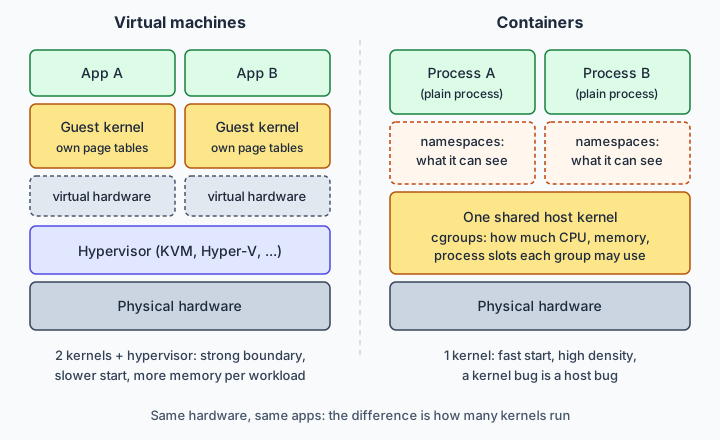
Draw both stacks and the difference is one box. In a VM stack the layers are hardware, hypervisor, guest kernel, then the application. Booting a VM means booting an operating system: firmware, kernel, init, services. Each VM reserves memory for its guest kernel and its page cache, and the hypervisor mediates access to devices.
In a container stack the layers are hardware, the host kernel, then the process. Starting a container is closer to starting a program: create namespaces, set cgroup limits, mount a filesystem image, exec. There is no boot sequence, which is why containers start quickly and why a host can run many more of them than VMs. I did not benchmark start times in this article, and numbers quoted online depend heavily on the image and the hypervisor, so treat any single figure with suspicion.
What you give up is the second kernel. A guest kernel is a wall: code in a VM that exploits its own kernel has still only compromised the guest. Containers have no such wall, so every container shares the host's kernel, version and all. You cannot run a different kernel version, or a different operating system's kernel, inside a container. A container is also not slower at computing. CPU-bound code runs at near-native speed in both; the differences are start time, memory overhead, density and isolation.
03Namespaces: what a process can see
Linux has eight namespace types, listed in the namespaces(7) man page: cgroup (the root of the cgroup hierarchy), IPC, network, mount, PID, time, user and UTS (hostname and domain name). Each hides one global resource. After joining a new PID namespace, a process sees only the processes inside it, numbered from 1. After joining a new network namespace it sees only its own interfaces and routing table. The OCI runtime specification lists the same kinds (pid, network, mount, ipc, uts, user, cgroup) as the settings a runtime can ask for.
You can check membership without any tools. Every process has a symlink per namespace in /proc/<pid>/ns/, of the form pid:[4026531836]. Two processes share a namespace exactly when those inode numbers match.
The first process in a new PID namespace is special. It gets PID 1, and the man page for pid_namespaces(7) gives it init duties: orphaned processes in the namespace are reparented to it, and if it exits the kernel kills every other process in that namespace with SIGKILL. It also gets signal protection: from inside the namespace, only signals for which it has installed a handler get through. That is why a container whose main process is a shell script ignores a plain Ctrl-C or docker stop for a while, then is killed after the timeout. The script never installed a SIGTERM handler.
Creating most namespaces needs the CAP_SYS_ADMIN capability. User namespaces are the exception: since Linux 3.8 an unprivileged process can create one, and inside it the process can hold a mapped root identity. That is the mechanism behind rootless containers.
04Experiment: build the isolation by hand
No Docker is needed to see namespaces work. I ran these on Linux 6.18.44 as root. The unshare command creates the namespaces and runs a program in them; --fork runs the program as a child, and --mount-proc mounts a fresh /proc so ps reports the new view.
unshare --uts --pid --fork --mount-proc sh -c 'hostname demo; hostname; echo pid=$$; ps -e | head -5; readlink /proc/self/ns/pid /proc/self/ns/uts'Output:
demo
pid=1
    PID TTY          TIME CMD
      1 ?        00:00:00 sh
      4 ?        00:00:00 ps
      5 ?        00:00:00 head
pid:[4026532266]
uts:[4026532265]
Back in the host shell, readlink /proc/self/ns/pid /proc/self/ns/uts printed pid:[4026531836] and uts:[4026531838], and hostname still said vm. The inode numbers change between runs; what matters is that they differ from the host's. uname -r printed 6.18.44-fc-v139 both inside and outside, since there is only one kernel.
The same thing from Python 3.13 with os.unshare:
import os, socket, sys
os.unshare(os.CLONE_NEWUTS | os.CLONE_NEWPID)
socket.sethostname("sandbox")
pid = os.fork()
if pid == 0:
    print("child getpid:", os.getpid(), "hostname:", socket.gethostname())
    print("child ns:", os.readlink("/proc/self/ns/pid"), os.readlink("/proc/self/ns/uts"))
    sys.stdout.flush(); os._exit(0)
os.waitpid(pid, 0)
print("parent ns:", os.readlink("/proc/self/ns/pid"), os.readlink("/proc/self/ns/uts"), socket.gethostname())
Output:
child getpid: 1 hostname: sandbox
child ns: pid:[4026532265] uts:[4026532264]
parent ns: pid:[4026531836] uts:[4026532264] sandbox
The last line is the trap. The parent's UTS namespace changed immediately (it printed sandbox), but its PID namespace did not (4026531836 is the host's). Unsharing a PID namespace only affects children created afterwards, which is also why unshare --pid needs --fork. The child got PID 1. (The explicit flush is there because os._exit skips Python's output buffers; without it the child's lines vanish.)
Finally, I ran unshare --user --map-root-user --uts --pid --fork --mount-proc as the unprivileged user nobody. It worked, and id -u inside printed 0. The same user without --user got Operation not permitted. That confirms the privilege rule above on this machine; other systems may restrict user namespaces by policy.
05cgroups: what a process may use
Namespaces say nothing about quantity. A process in a PID namespace can still eat all the RAM. That is the job of cgroups, which organise processes into a tree and attach controllers to it. In cgroup v2, the unified hierarchy, the files that matter are:
memory.max: a hard limit on memory. When usage cannot be pushed below it, the OOM killer runs inside that cgroup.memory.high: a throttle. Allocation is slowed and reclaimed, but the OOM killer is not invoked.cpu.max: two numbers,$MAX $PERIOD. The default ismax 100000;50000 100000means up to 50 ms of CPU time in every 100 ms period, about half a core.pids.max: a hard cap on processes;forkandclonefail with EAGAIN past it.memory.oom.group: kill every task in the cgroup together rather than one.
These come from the kernel's cgroup-v2 documentation. Controllers are switched on for child groups by writing +memory +cpu +pids to cgroup.subtree_control, and apart from the root, processes may live only in leaf groups. That second rule, the no-internal-process constraint, is what trips people up when they enable controllers on a group that still has processes in it.
The rule of thumb that interviews like: memory is incompressible, so exceeding the limit ends in a kill. CPU is compressible, so exceeding the quota ends in waiting. A container never gets killed for using too much CPU; it gets throttled.
06Experiment: a limit that really bites
I need to be upfront about one thing. The sandbox I ran in is a hybrid-cgroup machine: the memory, cpu and pids controllers are still bound to the old v1 hierarchy, and the v2 mount at /sys/fs/cgroup/unified offers no memory.max or cpu.max files. So the v2 commands above were not run by me. What I did run is the v1 equivalent, which uses different file names for the same ideas (memory.limit_in_bytes, cpu.cfs_quota_us, and pids.max, which keeps its name). The measurements below are real, but they are v1 measurements.
Memory. I made a group with a 50 MiB limit (echo 52428800 > memory/demo/memory.limit_in_bytes), moved a shell into it and tried to allocate 200 MiB:
bash -c 'echo $$ > /sys/fs/cgroup/memory/demo/cgroup.procs; python3 -c "x = bytearray(200*1024*1024)"; echo exit=$?'The shell reported Killed and exit=137 (128 plus signal 9). Afterwards memory.oom_control showed oom_kill 1, and the peak usage file read 52428800, exactly the limit.
CPU. A Python loop that spins for 4 seconds of wall time used 3.71 s of CPU time unrestricted. With cpu.cfs_quota_us set to 50000 against the default 100000 period, the same loop used 2.03 s of CPU in 4 s of wall time, and cpu.stat reported nr_periods 42 and nr_throttled 37. The process was never killed; it was paused for the rest of most periods.
Processes. With pids.max at 20, a loop forking sleeping children failed with [Errno 11] Resource temporarily unavailable after 18 children (the shell and the Python parent used the other two slots).
On a pure v2 host, the expected equivalents are memory.max for the first, cpu.max containing 50000 100000 for the second, and pids.max unchanged. Those are what the kernel documentation describes, not output I measured.
07Isolation, security and the VM inside Docker Desktop
A common mistake is to treat cgroups as a security feature. Docker's own security documentation says cgroups do resource accounting and limiting and do not prevent one container from accessing or affecting another's data. What gives isolation is the namespace view plus a restricted capability set; Docker starts containers with reduced capabilities.
All of that sits on one kernel, so a flaw in a system call implementation is a flaw in the host, reachable from inside a container. The isolation is real but its surface is the whole Linux system call interface. A VM shrinks that surface: an attacker in a guest must get through the hypervisor and its device emulation, a much narrower interface than a general-purpose kernel.
Three projects sit between the two. gVisor is an application kernel written in Go: it intercepts the container's system calls and handles them itself, so the host kernel is not asked to do them directly. Kata Containers runs each pod in its own lightweight VM, so it gets its own kernel, while still looking like a container to Kubernetes. Firecracker is a virtual machine monitor built on Linux KVM for running small microVMs, designed for multi-tenant serverless platforms; it is used underneath runtimes like Kata. The choice is the usual one: stronger separation costs some start time, memory or compatibility. Running your own team's services, plain containers are normally fine. Running code from strangers, add the second layer.
Where VMs hide. If containers share the host kernel, how does docker run ubuntu work on a Mac? It cannot use the macOS kernel, which has no Linux namespaces or cgroups. Docker Desktop starts a small Linux virtual machine and runs the containers inside it. A Docker engineering post from 2021 describes a LinuxKit-based VM on Mac and Windows, with WSL2 on Windows and a move from HyperKit to Apple's Virtualization framework on Mac. That post is dated, so check current Docker documentation for the hypervisor in use today.
So the honest statement is: on a Linux host, a container is a process on the host kernel; on a Mac, it is a process on a VM's kernel. Both are "shared kernel" containers, with the sharing happening one layer lower on the Mac. The same layering explains cloud setups that run each Kubernetes pod in a microVM.
A few more traps for interviews. Windows also has its own native container mode, which I did not research here, so I will not describe it. Containers are not obsolete VMs, and VMs are not outdated containers; a typical production setup runs containers on top of VMs, using the VM as the tenant boundary and the container as the packaging unit.
08Common interview questions
Q: What is the difference between a container and a virtual machine?
A: A VM runs its own guest kernel on virtual hardware provided by a hypervisor. A container is a process on the host kernel, restricted by namespaces and cgroups. VMs give stronger isolation; containers start faster and pack denser.
Q: What do namespaces do, and what do cgroups do?
A: Namespaces limit what a process can see: PIDs, network, mounts, hostname, users and so on. Cgroups limit and account for what it can use: memory, CPU time, process count. Neither alone makes a container.
Q: A container goes over its memory limit. What happens? And its CPU limit?
A: With memory.max the kernel's OOM killer runs inside that cgroup and kills a process, commonly shown as exit code 137. memory.high only throttles. Over its CPU quota (cpu.max), the container is throttled and never killed.
Q: Is a container as secure as a VM?
A: No. Containers share the host kernel, so a kernel vulnerability can reach the host. Defences include dropped capabilities and, for untrusted code, gVisor or microVM runtimes such as Kata Containers on Firecracker.
Q: Why does the main process of a container behave differently from other processes?
A: It is PID 1 in its PID namespace. It adopts orphans, the namespace dies with it, and signals without a handler are ignored, so a shell script as PID 1 may not respond to SIGTERM.
Q: How does Docker run Linux containers on a Mac?
A: Docker Desktop runs a Linux VM and starts the containers inside it, because they need a Linux kernel.