SQL Window Functions and CTEs: Top-N, Running Totals, Recursion
Window functions add per-group calculations without collapsing rows. Tested in SQLite: rank ties, the default-frame trap, dedupe, a cyclic recursive CTE, and a window top-2 about 2.5 times faster.
A SQL window function computes over a set of related rows and writes the result beside each row, without collapsing them like GROUP BY. Interviewers expect tie handling: row_number never repeats, rank gives ties the same number and then skips (1, 2, 2, 4), and dense_rank does not skip (1, 2, 2, 3). Window results are filtered in a CTE.
A window function computes over a set of related rows and writes the result beside each row, without collapsing them the way GROUP BY does. The traps are ties (rank, dense_rank and row_number differ) and the default frame, which includes tied peers. A CTE names a subquery so you can filter on a window result or walk a hierarchy with WITH RECURSIVE. On 100,000 rows in SQLite the window top-2 query beat the correlated subquery by about 2.5 times in the latest runs, and by more when the machine was busy.
- A window function such as avg(salary) over (partition by dept) returns every row with its group's value attached, while GROUP BY collapses the rows.
- On tied values, row_number gives unique numbers, rank gives ties the same number and then skips (1, 2, 2, 4), and dense_rank gives ties the same number without skipping (1, 2, 2, 3).
- Window functions run after WHERE, GROUP BY and HAVING, so they may appear only in SELECT and ORDER BY, and are filtered in an outer query or CTE.
- With ORDER BY and no frame, the default window frame includes the current row's peers, so two tied March orders both showed a running total of 450, while a ROWS frame gave 400 then 450.
- WITH RECURSIVE runs a starting query, then repeatedly runs a recursive query on the rows just produced, joined by UNION ALL, until a round returns no rows.
- On 100,000 rows in SQLite with an index on (dept, salary), a window-function top-2 query took about 0.088 s against 0.207 to 0.223 s for a correlated subquery.
01Keeping the rows while adding a calculation
Say you have a table of employees and you want each person's salary next to the average for their department. GROUP BY dept gives you the averages, but the individual rows are gone. The usual workaround is to join the table back to its own aggregate (the SQL joins topic covers that kind of self-join), which works and reads badly.
A window function does it in one pass. select name, dept, salary, avg(salary) over (partition by dept) from emp returns every employee with the average of their own department attached: 102.5 on all four Eng rows, for example. The function looks at a set of related rows (the window) for each row and writes one value beside it.
Most interview questions in this area come in a few shapes: top N per group, a running total, the previous row's value, rank with ties, removing duplicates. Each one needs a calculation across rows without losing the rows.
Everything below was run on Python's built-in sqlite3, SQLite 3.45.1 (window functions need 3.25 or later). Here is the whole data set, so you can re-run every printed result:
create table emp(id integer primary key, name text, dept text, salary int, boss int);
insert into emp values
 (1,'Asha','Eng',120,null),(2,'Ben','Eng',100,1),(3,'Cara','Eng',100,1),(4,'Dev','Eng',90,2),
 (5,'Esha','Sales',80,1),(6,'Farid','Sales',80,5),(7,'Gita','Sales',70,5),
 (8,'Ines','HR',65,1),(9,'Jon','HR',65,8),(10,'Kira','HR',50,8),(11,'Hugo','HR',45,10);

create table orders(id integer primary key, month text, amount int);
insert into orders values
 (1,'2026-01',100),(2,'2026-02',150),(3,'2026-03',150),
 (4,'2026-03',50),(5,'2026-04',200),(6,'2026-05',120);
Eleven people, three departments, and ties on purpose (Ben and Cara, Ines and Jon, Esha and Farid). boss holds the id of the person someone reports to; Asha has none.
02Anatomy of OVER
Every window call has two halves: the function (sum, rank, lag, any aggregate) and an OVER (...) clause that defines the window. Inside the parentheses you can put three things.
PARTITION BY dept splits the rows into independent groups. Leave it out and the whole result is one partition. ORDER BY salary desc sorts the rows inside each partition, and for ranking functions and running totals it is what gives the calculation meaning. The optional third part is the frame, which narrows the window further, and section 4 covers it.
select name, dept, salary,
       rank() over w as rk
from emp
window w as (partition by dept order by salary desc);
The named WINDOW w clause lets several columns share one definition. PostgreSQL and SQLite both accept it.
Order of evaluation explains the biggest restriction. Window functions run after FROM, WHERE, GROUP BY and HAVING, so they can only appear in the SELECT list and ORDER BY. Trying where rank() over (order by salary) = 1 in SQLite fails with misuse of window function rank(). The fix is to compute the rank in a subquery or CTE and filter in the outer query, which is the pattern in section 6.
03Ranking and ties
The three ranking functions differ only in how they treat equal values. All three were run over partition by dept order by salary desc:
name   dept   salary  row_number  rank  dense_rank
Asha   Eng    120     1           1     1
Ben    Eng    100     2           2     2
Cara   Eng    100     3           2     2
Dev    Eng    90      4           4     3
Ines   HR     65      1           1     1
Jon    HR     65      2           1     1
Kira   HR     50      3           3     2
Hugo   HR     45      4           4     3
Esha   Sales  80      1           1     1
Farid  Sales  80      2           1     1
Gita   Sales  70      3           3     2
Ben and Cara tie at 100. row_number still hands out 2 and 3, so one of them is arbitrarily second. rank gives both a 2, then skips to 4 for Dev, because two rows share place 2 and nobody holds 3. dense_rank gives both a 2 and Dev gets 3.
Ties also make row_number non-deterministic: which of Ben or Cara gets 2 can change between runs or engines unless the ORDER BY ends in a unique column such as id. And "second highest salary" has two readings. The second distinct value is dense_rank = 2, which returned Ben and Cara for Eng, Kira for HR and Gita for Sales. The person in second place is rank = 2, which exists only in Eng here (Ben and Cara); HR and Sales have no rank 2 because two people share first.
row_number is also the standard way to remove duplicates. A small users table (ids 1 to 6) shows it with repeated emails: a@x.com appears three times and b@x.com twice.
select id, email,
       row_number() over (partition by email order by id) as rn
from users order by email, id;
(1, 'a@x.com', 1) (3, 'a@x.com', 2) (6, 'a@x.com', 3)
(2, 'b@x.com', 1) (5, 'b@x.com', 2) (4, 'c@x.com', 1)Keep the rows where rn = 1 and you get ids 1, 2 and 4, the earliest row per email. Deleting with delete from users where id in (select id from (... ) where rn > 1) left the same three rows. The order by id inside the window decides which copy survives, so say which one you want.
04Running totals and the default frame
A running total is an aggregate with an ORDER BY inside OVER. It looks simple, and it has one trap.
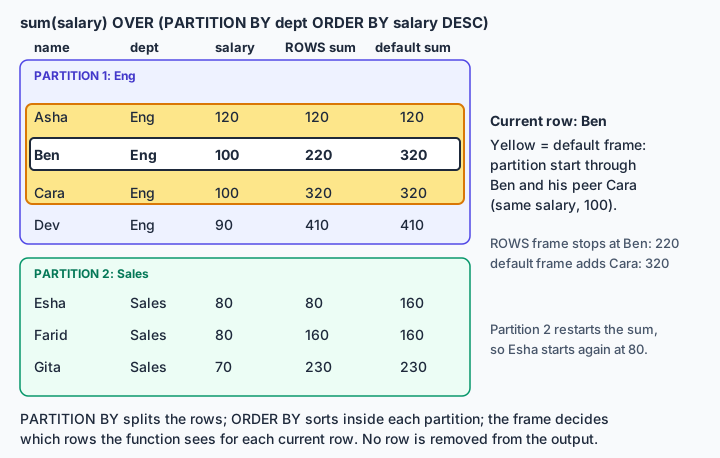
The frame is the slice of the partition the function actually sees for the current row. If you write ORDER BY and no frame, the default is from the start of the partition through the current row plus its peers, meaning rows that tie with it on the ORDER BY value. This is the RANGE behaviour. Without ORDER BY the frame is the whole partition. That is how the PostgreSQL docs describe it, and SQLite gave the same results here.
The orders table has two rows in March (150 and 50). Comparing the default against an explicit ROWS frame:
select month, amount,
  sum(amount) over (order by month) as dflt,
  sum(amount) over (order by month
      rows between unbounded preceding and current row) as by_rows
from orders;
2026-01 100 100 100
2026-02 150 250 250
2026-03 150 450 400
2026-03 50 450 450
2026-04 200 650 650
2026-05 120 770 770On the first March row the default frame already includes the second March row, so it jumped to 450, while ROWS gave 400. The diagram shows the same mechanism on the employee data: for Ben, the default frame reaches Cara because they tie at 100.
The last_value surprise has the same cause. On the Eng department, last_value(name) over (partition by dept order by salary desc) returned Asha, Cara, Cara, Dev for the four rows (Ben and Cara are peers, so Ben's frame already ends at Cara), not Dev every time. Adding rows between unbounded preceding and unbounded following returned Dev on all four rows.
05lag and lead for row-to-row change
lag(value, offset, default) returns the value from offset rows before the current row, using the window's ordering; lead looks forward. The offset defaults to 1, and the default value for rows with nothing before them is NULL. These two functions replace the old self-join on the previous month (see the SQL joins topic), which breaks as soon as a month is missing.
A month-over-month change on the orders data, where the aggregate is computed first and the window runs over the grouped result:
select month, sum(amount) as total,
       sum(amount) - lag(sum(amount)) over (order by month) as change
from orders group by month;
2026-01 100 None
2026-02 150 50
2026-03 200 50
2026-04 200 0
2026-05 120 -80The first month has no previous row, so its change is NULL, shown as None by Python. Passing a third argument, lag(x, 1, 0), would turn that into 0 when that is what you want.
Writing sum(amount) inside lag(...) is legal because window functions run after GROUP BY, so the grouped sums are the rows being windowed. lag is positional: if January were missing, February would compare against whatever row came before it, so check for gaps when consecutive periods matter.
06CTEs, filtering windows and recursion
A common table expression is a named query attached to one statement with WITH. For the top-N-per-group task it is the cleanest way around the no-window-in-WHERE rule:
with r as (
  select name, dept, salary,
         dense_rank() over (partition by dept order by salary desc) as dr
  from emp)
select dept, name, salary from r where dr <= 2 order by dept, dr;
On the sample data this returned nine rows: Asha, Ben and Cara for Eng (Ben and Cara tie), Ines, Jon and Kira for HR, and Esha, Farid and Gita for Sales. Hugo, fourth in HR, is cut. A subquery in FROM could do the same job; the CTE just lets you name each step and read the query top to bottom.
WITH RECURSIVE handles trees and graphs. It has a non-recursive starting query, then UNION ALL, then a recursive query that refers to the CTE itself. The database runs the start, then repeatedly runs the recursive part on the rows just produced, until a round returns nothing. An org chart from the boss column:
with recursive chain(id, name, depth) as (
  select id, name, 0 from emp where boss is null
  union all
  select e.id, e.name, chain.depth + 1
  from emp e join chain on e.boss = chain.id)
select * from chain order by depth, id;
Asha came back at depth 0; Ben, Cara, Esha and Ines at depth 1; Dev, Farid, Gita, Jon and Kira at depth 2; and Hugo, who reports to Kira, at depth 3.
Cyclic data is the trap. On a copy of the table where Asha reports to Hugo, the loop is closed. With that edit nobody has a NULL boss, so the query above would return nothing; to see the loop the recursion has to start from where id = 1. Started there, it never stops without a guard. Adding where chain.depth < 6 to the recursive part makes it stop: 21 rows came back, depth 0 through 6, with every person repeating as the loop went round (Asha showed up again at depth 4). The cap ends the recursion but does not remove the repeats, so a real query should also carry a path or visited-id column and skip ids already seen.
UNION instead of UNION ALL can also end a cycle, but only when the recursive rows hold nothing that changes every round. In the query above every row carries depth, which grows, so no row is ever a duplicate and UNION would not help. Selecting just id with UNION, again starting from id = 1 on the same looped table, returned 11 rows and stopped.
Performance is engine-specific. In PostgreSQL 12 and later, a side-effect-free, non-recursive CTE referenced once is inlined into the main query, and one referenced several times is computed once and stored, with MATERIALIZED and NOT MATERIALIZED to override. That was not run on PostgreSQL; it comes from its documentation. Other engines and older PostgreSQL versions behave differently, so a CTE is not automatically faster or slower than a subquery.
07Window function against correlated subquery
The other classic way to get the top 2 per group is a correlated subquery: keep a row if fewer than 2 rows in its group have a higher salary. It is correct, and it runs a separate count for every row.
The test table has 100,000 rows in SQLite, 1,000 departments, random salaries and an index on (dept, salary). Each query was timed with time.perf_counter, best of three, and the whole script was repeated three times on a sandbox with unknown other load:
                      run 1    run 2    run 3
correlated subquery   0.223 s  0.213 s  0.207 s   (2000 rows)
rank() window         0.088 s  0.088 s  0.087 s   (2000 rows)
window, no index      0.122 s
Both queries returned the same 2,000 rows, and the window version was about 2.5 times faster. Earlier runs on a busier machine gave much slower times for both and a wider gap, roughly 3 to 5 times, so absolute numbers move a lot and only the ordering held. This is one engine, one machine and one data shape; treat it as an illustration, not a benchmark. Without the index, the correlated query was too slow to time here.
explain query plan shows the difference. The correlated query reads SCAN b, then for every row runs SEARCH x USING COVERING INDEX ix (dept=? AND salary>?), a fresh index lookup and count each time. The window query reads SCAN big USING COVERING INDEX ix once. The index supplies the dept order, but the window sorts by salary desc while the index is ascending, so the plan still contains USE TEMP B-TREE FOR RIGHT PART OF ORDER BY and runs the ranking inside a co-routine. The index helps the window version a little (0.12 s without it, 0.09 s with it) and the correlated one far more. The database indexing topic and the query optimization and EXPLAIN topic cover how to read plans like these.
08Common interview questions
Q: What is the difference between row_number, rank and dense_rank?
A: All three number rows inside a partition by ORDER BY. row_number never repeats, even on ties. rank gives tied rows the same number and then skips (1, 2, 2, 4). dense_rank gives ties the same number without skipping (1, 2, 2, 3).
Q: How do you get the top 2 earners in each department?
A: Compute dense_rank() (or rank, or row_number if exactly two rows per group are wanted) over partition by dept order by salary desc in a CTE or subquery, then filter rank <= 2 in the outer query. Say which tie behaviour you chose.
Q: Why can't I use a window function in WHERE?
A: WHERE is evaluated before window functions run, so the value does not exist yet. Window functions are allowed only in SELECT and ORDER BY. Wrap the query in a CTE or subquery and filter outside.
Q: My running total jumps on duplicate dates. Why?
A: With ORDER BY and no frame, the default frame includes the current row's peers, rows with an equal ORDER BY value. Use rows between unbounded preceding and current row, or add a unique tiebreaker column to the ORDER BY.
Q: Is a CTE faster than a subquery?
A: Not by itself. It mainly improves readability and enables recursion. Whether it is inlined or computed once depends on the engine; in PostgreSQL 12 and later a single-use CTE is inlined by default and a multi-use one is materialized unless you say otherwise.
Q: How do you find the nth highest salary per department?
A: Compute dense_rank() over (partition by dept order by salary desc) in a CTE and filter dr = n. dense_rank gives the nth distinct salary; rank would skip numbers after ties and might return no row for n.