XSS, CSRF and SQL Injection
SQL injection, XSS and CSRF as one idea: untrusted data reaching a receiver that trusts it. Matching fixes for each, cookie attributes, and a tested concatenation versus parameterized query demo.
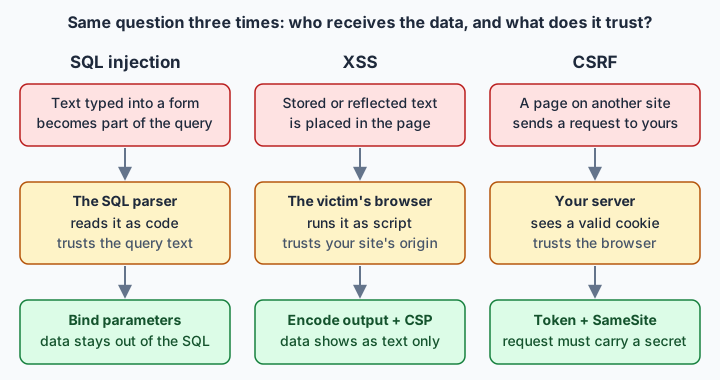
SQL injection, XSS and CSRF all come from trusting data or requests that should have been checked. SQL injection lets input rewrite a SQL query, XSS runs injected script in the victim's browser on your site's origin, and CSRF forges a request that carries the user's cookie. The primary fixes are parameterized queries, output encoding and anti-CSRF tokens.
SQL injection, XSS and CSRF all come from trusting data or requests you should have checked. SQL injection is data reaching the SQL parser, XSS is data reaching the browser as script, and CSRF is a forged request riding the user's cookie. Each has a different primary fix: parameterized queries, output encoding, and anti-CSRF tokens.
- Injection is number 5 in the OWASP Top 10:2025, down from number 3, and that category counts both XSS and SQL injection.
- Parameterized queries stop SQL injection because the SQL structure is sent first and values separately, so the input ' OR '1'='1 is compared as a literal password.
- SQL placeholders bind values, not table or column names, so a user-chosen sort column must be checked against a fixed allow-list.
- XSS output encoding must match the context: Python's html.escape is correct for HTML body and attribute contexts but not for JavaScript or URL contexts.
- The OWASP CSRF cheat sheet treats SameSite cookies as defence in depth that does not replace a CSRF token in most deployments.
- HttpOnly cookies stop JavaScript from reading the cookie but do not stop XSS, and HTTPS stops none of SQL injection, XSS or CSRF.
01One question for all three attacks
Each of these attacks fools a receiver: a component that takes what it is handed and acts on it. SQL injection, XSS and CSRF differ in which receiver gets fooled. In every case, data that someone else controls ends up somewhere that treats it as an instruction, or a request arrives carrying credentials the user never meant to use.
In SQL injection the receiver is the database's SQL parser: text typed into a form becomes part of the query and changes what the query does. In cross-site scripting (XSS) the receiver is the victim's browser: text stored or reflected by your site is parsed as script and runs with your site's origin. In cross-site request forgery (CSRF) nothing is parsed at all. A page on another site makes the victim's browser send a request to yours, and the browser attaches the session cookie automatically, so your server cannot tell the click was not intended.
Injection sits at number 5 in the OWASP Top 10:2025, down from number 3, and that category counts both XSS and SQL injection. The page describes injection as untrusted input sent to an interpreter, and its preferred prevention is a safe API with a parameterized interface. CSRF has its own cheat sheet but the same shape: the server trusts something it should have checked.
One more point belongs at the start. If you read the HTTPS and TLS article, you know TLS keeps the connection private and tied to the right domain. None of these three attacks breaks TLS. They all happen inside a perfectly valid encrypted session, so the padlock does not help against any of them.
02SQL injection: when data rewrites the query
A query is text that the database parses into a plan. If you build that text by pasting user input between quote marks, the input is parsed along with your code. A value that contains a quote character can close your string literal early and add its own conditions. The attacker never needs to break anything. The database does exactly what the finished text says.
The fix is to stop building the text. With a parameterized query (a prepared statement) you send the SQL with placeholders first and the values separately. The database has already decided the structure, so a value can only ever be a value. That is the job of a bind variable, as OWASP's Query Parameterization cheat sheet frames it: marking the inputs as data rather than code.
Prepared statements head the list of primary defences in the OWASP SQL injection cheat sheet, alongside properly constructed stored procedures and allow-list input validation. Escaping all user input is marked strongly discouraged there: fragile, with no guarantee that it stops every injection. Stored procedures are not automatically safe either, because a procedure that builds dynamic SQL inside itself has the same flaw one layer down.
Two supporting habits matter. First, least privilege: the application's database account should not have admin or DBA rights, so a flaw costs less. Second, identifiers. Placeholders stand in for values, not for table or column names, so a user-selected sort column cannot be bound. For those parts OWASP recommends input validation or redesigning the query. In practice that means comparing the requested name against a fixed set that you wrote.
03The experiment: concatenation against binding
I ran this with Python 3.13 and its built-in sqlite3, using an in-memory database and one made-up user. The input ' OR '1'='1 is the standard textbook tautology and does nothing outside this toy table.
import sqlite3

db = sqlite3.connect(":memory:")
db.execute("CREATE TABLE users (name TEXT, password TEXT)")
db.execute("INSERT INTO users VALUES ('alice', 's3cret')")

def bad(name, pw):
    q = f"SELECT name FROM users WHERE name = '{name}' AND password = '{pw}'"
    return q, db.execute(q).fetchall()

def good(name, pw):
    return db.execute(
        "SELECT name FROM users WHERE name = ? AND password = ?", (name, pw)
    ).fetchall()

tricky = "' OR '1'='1"
print("concat, wrong pw:", bad("alice", "wrong")[1])
q, r = bad("alice", tricky)
print("concat, textbook input:", r)
print("SQL that was built:", q)
print("param, wrong pw:", good("alice", "wrong"))
print("param, textbook input:", good("alice", tricky))
Real output:
concat, wrong pw: []
concat, textbook input: [('alice',)]
SQL that was built: SELECT name FROM users WHERE name = 'alice' AND password = '' OR '1'='1'
param, wrong pw: []
param, textbook input: []
The wrong password alone returns nothing, as it should. The textbook input in the password field returns alice. Look at the built SQL: the input added an OR clause, and because AND binds tighter than OR, the condition after OR is always true. The WHERE clause now matches every row, so the password test no longer matters. The parameterized version treated the identical text as a literal, odd-looking password, compared it with the stored one, and found no match.
The second script covers identifiers. It adds a second user, bob, then tries to bind a column name with ORDER BY ? DESC, and finally checks the requested column against a fixed allow-list before putting it into the SQL:
import sqlite3

db = sqlite3.connect(":memory:")
db.execute("CREATE TABLE users (name TEXT, password TEXT)")
db.executemany("INSERT INTO users VALUES (?, ?)",
               [("alice", "s3cret"), ("bob", "pw2")])

# Binding a column name: the database sorts by the constant string 'name'.
print("bound, DESC:", db.execute(
    "SELECT name FROM users ORDER BY ? DESC", ("name",)).fetchall())

SORTABLE = {"name", "password"}

def list_users(column, direction="ASC"):
    if column not in SORTABLE or direction not in ("ASC", "DESC"):
        return "rejected"
    sql = f"SELECT name FROM users ORDER BY {column} {direction}"
    return db.execute(sql).fetchall()

print("allow-list, name DESC:", list_users("name", "DESC"))
print("allow-list, odd input:", list_users("name; DROP TABLE users"))
Real output:
bound, DESC: [('alice',), ('bob',)]
allow-list, name DESC: [('bob',), ('alice',)]
allow-list, odd input: rejected
The bound version raised no error, which makes it look fine, but it asked for descending order and got alice first. The placeholder became the constant string 'name', the same for every row, so nothing was sorted. The allow-list version sorted correctly, and the odd input never reached the database. Building SQL with an f-string is safe there only because column and direction can be nothing except the values you wrote.
04XSS: script that runs as your page
XSS means attacker-influenced script runs in a victim's browser with the permissions of your site. It is usually described in three kinds. Stored XSS saves the text on your server (a comment, a profile name) and serves it to everyone who views it. Reflected XSS echoes a request value straight into the response, for example a search term in the results page. DOM-based XSS never touches the server: client-side code takes a value from the URL or elsewhere and writes it into the page unsafely.
Output encoding is the primary defence, and it has to match where the text lands. When data must appear exactly as the user typed it, the OWASP XSS Prevention cheat sheet points to output encoding, with different rules for HTML body, attribute, JavaScript and URL contexts. Python's html.escape is correct for the first two and wrong for the others. This script escapes a string for the page body, then builds an <input value="..."> around the harmless text x" onmouseover="doThing(), once with default escaping and once with quote=False:
import html

s = '<b>hi</b> & "bye"'
print(html.escape(s))
print(html.escape(s, quote=False))

v = 'x" onmouseover="doThing()'
print(f'<input value="{html.escape(v)}">')
print(f'<input value="{html.escape(v, quote=False)}">')
Real output:
<b>hi</b> & "bye"
<b>hi</b> & "bye"
<input value="x" onmouseover="doThing()">
<input value="x" onmouseover="doThing()">In the first two lines the markup now displays as visible characters instead of being parsed. The last two show why quote handling matters inside attributes. With default escaping the value stays one attribute. With quote=False the text closed the value early and became a second attribute.
Template engines and UI frameworks that escape by default do this for you, so the usual bugs come from the escape hatches: raw-HTML insertion, string-built templates and writing into innerHTML. If users must be allowed some HTML, such as a rich-text comment, run it through a sanitizer library; DOMPurify is the one the OWASP cheat sheet names. Do not write your own filter.
DOM-based XSS needs its fix in the browser code, because the server never sees the value. Write untrusted strings with textContent, which the browser always treats as plain text, rather than innerHTML, which parses them as markup. More generally, do not insert an untrusted string into the page as HTML at all; build elements and set their text instead.
Content Security Policy (CSP) is a second layer. MDN's CSP guide presents it as mainly a defence against XSS and not an alternative to sanitizing input. A nonce-based policy lets only scripts carrying the page's one-time nonce run. That nonce has to change on every response and must not be predictable, and allowing 'unsafe-inline' throws away much of what a CSP is for. Input validation helps catch junk but is not the main fix, because the same text may be valid input and still dangerous output.
05CSRF: the browser sends the cookie anyway
Suppose you are logged in to a bank site and, in another tab, open a page that contains a hidden form pointing at the bank's transfer URL. Your browser sends that request and includes the bank's session cookie, because cookies belong to the destination, not to the page that triggered the request. The server sees a valid session and a well-formed request. The attacker cannot read the response, but for a state-changing action they do not need to.
The standard defence is a token tied to the user's session. The server puts it in every form it renders and rejects any state-changing request that does not send it back. A page on another site cannot read your form, so it cannot supply the token. In the classic synchronizer token pattern the server generates a random token per session and stores it. The OWASP CSRF cheat sheet describes that pattern as one of the most popular and recommended.
Another family is the double-submit cookie. The server sets a random value in a cookie, the page also sends the same value in a form field or header, and the server only checks that the two match, so it stores nothing. OWASP marks the plain version discouraged and recommends the signed version, where the value carries an HMAC made with a server-side key, so a value the server did not issue fails the check.
The script below is a simulation of the server check, not a real web server. It uses a stateless variant: instead of storing a token per session, the server computes the token as an HMAC of the session id under a key only the server knows, and recomputes it to check each request.
import hashlib, hmac, secrets

SECRET = secrets.token_bytes(32)  # server-side key, never sent to the browser

def token(sid):
    return hmac.new(SECRET, sid.encode(), hashlib.sha256).hexdigest()

def transfer(sid, tok):
    if not tok or not hmac.compare_digest(tok, token(sid)):
        return "403 rejected"
    return "200 done"

print("forged (cookie only):", transfer("sess-A", None))
print("own form (with token):", transfer("sess-A", token("sess-A")))
print("token from another session:", transfer("sess-A", token("sess-B")))
Real output:
forged (cookie only): 403 rejected
own form (with token): 200 done
token from another session: 403 rejected
The forged request has the cookie but no token, so it fails. A token copied from a different session fails too, because it is bound to that other session id. hmac.compare_digest compares in constant time, so response timing does not leak how much of a guess was right.
The token is not the whole job. Keep state changes off GET requests, because links and images trigger GETs freely; the CSRF cheat sheet says so directly. Ask again for the password or a second factor before very sensitive actions. Most of all, fix XSS first. Injected script runs on your origin and can read the token straight from the page, which is why the same cheat sheet warns that XSS can defeat every CSRF mitigation.
06Cookie attributes: what each one stops
Three cookie attributes get mixed up in interviews, so keep what each does separate. All of them are set on the Set-Cookie header. Python's standard library builds one like this:
from http.cookies import SimpleCookie
c = SimpleCookie()
c["sid"] = "abc123"
c["sid"]["httponly"] = True
c["sid"]["secure"] = True
c["sid"]["samesite"] = "Lax"
c["sid"]["path"] = "/"
print(c.output())
Real output:
Set-Cookie: sid=abc123; HttpOnly; Path=/; SameSite=Lax; Secure- HttpOnly: JavaScript cannot read the cookie through
document.cookie. It blunts cookie theft after an XSS bug. It does not stop the injected script from running, sending requests that carry the cookie, or rewriting the page. The OWASP XSS cheat sheet makes the same point: cookie attributes limit the impact of XSS, not its execution. - Secure: the cookie is only sent over HTTPS. It protects against the cookie crossing a plain connection and says nothing about the three attacks here.
- SameSite=Strict: the cookie is sent only on same-site requests.
- SameSite=Lax: also sent on cross-site top-level navigations that use a safe method, such as a link click, but not on cross-site POSTs or subresource loads. A safe method is one meant only to read, never to change state: GET, HEAD and OPTIONS.
- SameSite=None: sent on cross-site requests too, and requires Secure.
According to MDN's Set-Cookie reference, some browsers treat a missing SameSite attribute as Lax. Browser defaults differ, so set the attribute explicitly. The cookie draft (RFC 6265bis, still an Internet-Draft, not a finished RFC) also describes an optional short-lived exception that lets some cookies without an explicit attribute travel on cross-site POSTs, so a missing attribute can behave differently from what you expect.
SameSite helps against CSRF, yet the CSRF cheat sheet treats it as defence in depth that does not replace a proper CSRF defence in most deployments. Two limits explain why. Same-site is not same-origin. The check compares registrable domains: the part of a host name that someone can actually register, such as example.com for both app.example.com and blog.example.com. So a sibling subdomain counts as same-site even though it is a different origin. And Lax still lets top-level GET navigations carry the cookie, so a state-changing GET endpoint stays exposed.
07A layered checklist, and what HTTPS does not do
A short checklist you can recite, with the primary fix first and the backup after it:
- SQL injection: parameterized queries everywhere; an allow-list for column and table names; a database account with minimal rights; no dynamic SQL inside stored procedures built from raw input.
- XSS: auto-escaping templates; context-correct encoding when you write output yourself; a sanitizer for allowed HTML; a nonce-based CSP; HttpOnly cookies to limit damage.
- CSRF: synchronizer tokens (or signed double-submit) on state-changing requests; SameSite=Lax or Strict as an extra layer; no state changes on GET; fresh authentication for sensitive actions.
ORMs sit in the middle. Their query-builder and parameter APIs bind values properly, so an ORM is as safe as a prepared statement while you stay inside them. The moment you format a raw SQL fragment into a string, including inside an ORM's raw-query escape hatch, you are back to concatenation. The same goes for the sort-column problem above.
HTTPS stops none of the three. It protects the path between browser and server, while these attacks use the browser and the server themselves. A valid certificate is on the page that serves stored XSS, and a forged request travels over a valid TLS connection. NoSQL databases have their own injection problems too.
08Common interview questions
Q: What is SQL injection and how do you stop it?
A: It happens when user input is joined into SQL text, so the input can change the query's structure. The primary fix is parameterized queries, which send values separately from the SQL. Add a least-privilege database account and an allow-list for table or column names. Escaping is a fragile last resort.
Q: What is the difference between XSS and CSRF?
A: XSS runs attacker-influenced script inside your site's origin in the victim's browser. CSRF makes the victim's browser send a request to your site from somewhere else, carrying their cookies. XSS abuses the user's trust in the site, while CSRF abuses the site's trust in the browser. XSS can defeat CSRF tokens, but not the other way round.
Q: How do you prevent XSS?
A: Encode output for the context it lands in, preferably through a framework that escapes by default. Sanitize with a vetted library if you must accept HTML. Add a CSP with nonces and no unsafe-inline as a second layer. Input validation helps but is not the main fix.
Q: How do you prevent CSRF, and does SameSite replace tokens?
A: Use a synchronizer token, or a signed double-submit cookie (a cookie value the page echoes back, carrying a server HMAC), on every state-changing request, and never change state on GET. SameSite cookies are a good extra layer but OWASP says they do not replace a proper defence in most deployments, since same-site is looser than same-origin and Lax allows top-level GET navigations.
Q: Does HttpOnly stop XSS? Does HTTPS stop any of these attacks?
A: No to both. HttpOnly only stops scripts reading that cookie, so the injected script can still make authenticated requests and change the page. HTTPS protects the connection, but all three attacks work inside a valid encrypted session.
Q: Are ORMs immune to SQL injection?
A: Only while you use their parameterized or query-builder APIs. A raw SQL string built with formatting is just as vulnerable as hand-written SQL, and column or table names still need an allow-list.